주제
DataFrame 심화
1. 데이터 함수 적용 (apply)
2. 값 매핑과 요소 함수 적용 (map, applymap)
3. 값 교체 (replace)
4. 조건식 (where)
5. 집계함수 적용(agg)
6. 멀티인덱싱
데이터 함수 적용 (apply)
- apply()
- 시리즈에 각 함수 실행결과를 적용시킴
- 함수를 먼저 만든 후, 해당 함수를 인자로 주입
# 나이 별 구분
def classify_age(age):
    if age >= 0 and age <= 12:
        return "Child"
    elif age >= 13 and age <= 19:
        return "Teenager"
    elif age >= 20 and age <= 39:
        return "Young Adult"
    elif age >= 40 and age <= 64:
        return "Middle-aged"
    elif age >= 65:
        return "Elderly"
    else:
        return "Invalid age"


# Age_Group이라는 새로운 컬럼 생성
customers['Age_Group'] = customers['Age'].apply(classify_age)

# 확인
customers.head()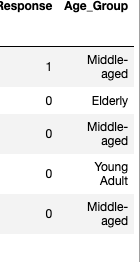
# 열 이동 = 제거&반환 - 새로 삽입
data = customers.pop('Age_Group')
customers.insert(2, 'Age_Group', data)
customers.head()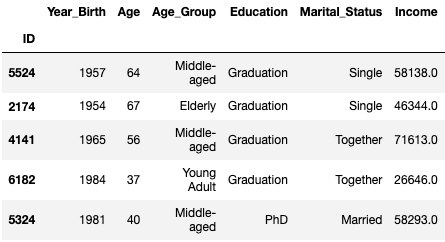
- 예시2 : 연간 수익(Income)을 달러 → 원화로 변경
- lambda를 이용한 방법
# 2023-12-09 기준 1달러 == 1312원
income_kr = customers['Income'].apply(lambda x : x * 1312)
customers.insert(6, 'Income_Kr', income_kr)
값 매핑과 요소 함수 적용 (map, applymap)
- map()
- 각 값에 매핑
- 단, 매핑이 안된 값은 NaN이 된다
# 사용할 데이터
people_set = {
    'Name' : ['Spencer', 'Mark', 'Tom', 'Peter'],
    'Major': ['Computer', 'Science', 'English', 'Computer'],
    'YearOfJoining' : [2020, 2019, 2018, 2017],
    'DriverLicense' : [True, False, False, True],
    'TeacherCertification' : [True, False, False, False],
}

# map() 으로 매핑 확인해서 값 변환
people['DriverLicense'] = people['DriverLicense'].map({True: 'Yes', False: 'No'})
people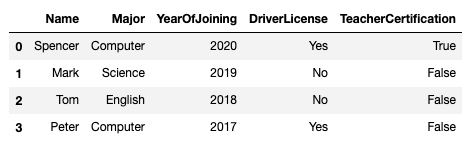
- applymap()
- 모든 요소에 apply()를 적용
# 모든 값을 str 타입으로 변환 후 타입 조회
people.applymap(str).applymap(type)
- 예시 2 : 모든 요소를 제곱 연산 적용
# Lambda도 살펴보자
df = pd.DataFrame({'A': [1, 2, 3],
                   'B': [4, 5, 6],
                   'C': [7, 8, 9]})

 # applymap()을 사용하여 제곱 연산 적용
df_squared = df.applymap(lambda x: x**2)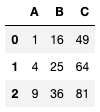
값 교체 (replace)
- replace()
- 지정한 요소를 다른 값으로 대체
- 시리즈, 데이터프레임 모두 가능하다
- 없는 값을 바꾸려고 한다면 에러는 뜨지 않고 원본이 그대로 조회된다
# 방법 1. 시리즈.replace(dict)
customers['Marital_Status'] = customers['Marital_Status'].replace({
	'Alone': 'Single',
    'Absurd': 'Single',
    'YOLO': 'Single'
 })

# 방법 2. 시리즈.replace(to_replace:list, value)
customers['Marital_Status'].replace(['Alone', 'Absurd', 'YOLO'], 'Single')

# 방법 3. 데이터프레임.replace()
customers.replace({'Alone': 'Single', 'Absurd': 'Single', 'YOLO': 'Single'})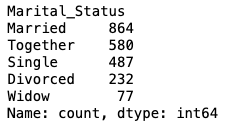
조건식 (where)
- where()
- 조건식을 인자로 넣어 조건에 맞는 데이터와 아닌 데이터는 NaN으로 반환한다
- NaN 데이터를 빼고 조건에 맞는 데이터만 반환하고 싶다면 dropna()와 함께 쓰면 된다
# 자녀가 2명 이상인 고객
customers.where(customers['Kidhome'] >= 2)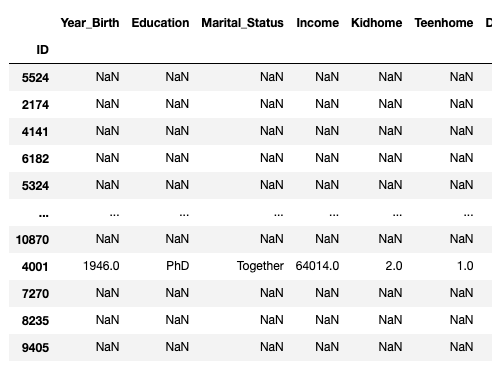
# .where()이후 .dropna()
customers.where(customers['Kidhome'] >= 2).dropna()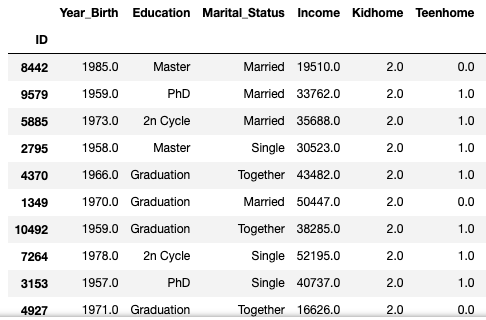
- 인자를 사용하여 조건에 맞지 않는 데이터는 은닉하는 방법
- other=
# 방법 1. other로 대체하기
customers.where(customers['Kidhome'] >= 2, other='---')

# 방법 2. default인 NA가 되도록 놓거나 other에 None으로 대체하기
customers.where(customers['Kidhome'] >= 2, other=None)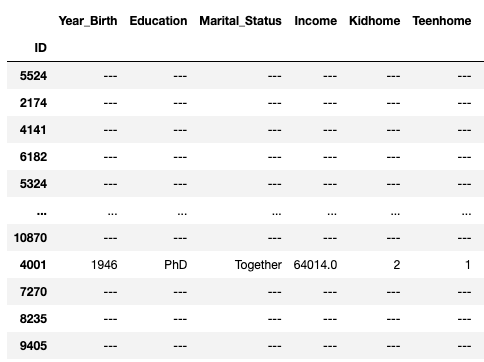
집계함수 적용(agg)
- agg()
- func : function, str, list or dict
- 데이터를 집계하는 데 사용할 함수를 지정
- DataFrame을 인자로 받을 수 있는 함수나 DataFrame의 apply() 메소드에 사용할 수 있는 함수여야 한다
- numeric_only=True가 안됨!! 존재하지 않는 인자
# 방법1. dict로 전달
# Income -> max, Kidhome -> mean
customers.agg({'Income': 'max', 'Kidhome': 'mean'})

# Income -> [min, max, std], Kidhome -> ['min', 'max', 'mean']
customers.agg({'Income': ['max', 'min', 'std'], 'Kidhome': ['mean', 'max', 'min']})
# 방법2. dict없이 str 또는 list로 전달하기
customers.agg(['max', 'min'])
멀티인덱싱
- 하나 이상의 인덱스 레벨을 가지는 인덱스 구조를 뜻한다
- 데이터를 계층적(hierarchical)으로 조직화함
- 다양한 차원에서 데이터 접근이 가능
- 멀티인덱스 생성은 데이터프레임 또는 시리즈를 생성할 때 인덱스를 array같은 형태로 지정한다
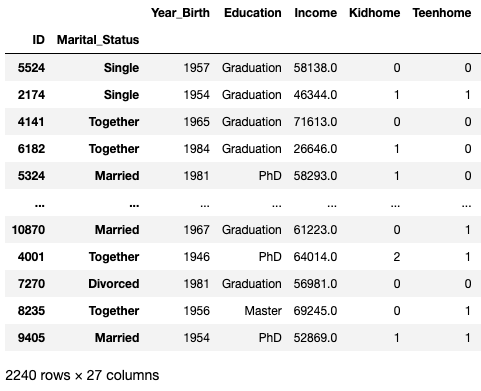
- 멀티인덱스 설정 방법 1
customers = pd.read_csv('marketing_campaign.csv', sep='\t', index_col=['ID', 'Marital_Status'])
customers
- 멀티인덱스 설정 방법 2
- set_index()를 사용
customers.set_index(keys=['ID', 'Marital_Status'], inplace=True)
- 멀티인덱스에 접근하는 법
- get_level_values(level)
- 인덱스의 자리를 넣으면 해당 인덱스를 시리즈로 반환
- get_level_values(level)
customers.index.get_level_values(0)
- 멀티인덱스의 자리를 바꾸는 법
- swaplevel()
- 인덱스의 자리를 바꾼다
- swaplevel()
customers.swaplevel()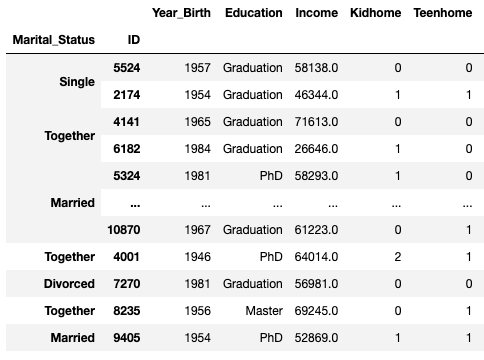
멀티인덱스를 활용해 조회하기
- 인덱스 레벨 0으로 조회
customers.loc['Single']

# Single인 고객 중 ID가 5524인 고객의 수입만 조회
customers.loc[('Single', 5524), 'Income']

# 여러 컬럼을 조회하고 싶은 경우
customers.loc[('Single', 5524), ['Income', 'Kidhome']]
- 슬라이싱을 이용한 인덱스 여러 값 조회
- : 를 마지막에 추가해주어야 더 많은 레벨을 조회할 때 에러가 나지 않는다
# 'Single', 'Alone', 'Absurd', 'YOLO' 만 조회
customers.loc[['Single', 'Alone', 'Absurd', 'YOLO']]
customers.loc[['Single', 'Alone', 'Absurd', 'YOLO'], :]


# 2개의 인덱스를 사용할 땐
# .loc[([lv1_labels], [lv2_labels])]
customers.loc[(['Single', 'Alone', 'Absurd', 'YOLO'], [5524, 2114, 92, 4369, 11133]), : ]
특정 level 생략 - 행 조회
# 특정 row 조회
customers.loc[:, 2114, :]

# 특정 여러 row 조회
customers.loc[:, [2114,92], :]

# 뒤에 :를 생략하면 에러
customers.loc[:, [2114,92]]
특정 level 생략 - 행과 열 조회
1. slice() 사용
# 하나씩 해도 에러
customers.loc[:, 2114, 'Income']

# 해결 방법 1 (시리즈)
customers.loc[(slice(None), 2114), 'Income']

# 데이터프레임
customers.loc[(slice(None), 2114), ['Income', 'Kidhome']]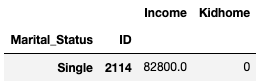
2. pd.IndexSlice[] 사용
# 해결 방법 2
customers.loc[pd.IndexSlice[:, 2114], ['Income', 'Kidhome']]

customers.loc[pd.IndexSlice[:, 2114], ['Income']]
느낀점
점점 깊은 내용을 배울수록 확실히 어렵다고 느꼈다. 특히 멀티인덱스 상황에서 특정 행과 열을 조회하는 문법이 헷갈리는데 나중에 사용할 일이 생기면 그때 다시 돌아오면 되지 않을까 생각한다.. 그래도 이번주에 배우는 내용이 너무 유익하고 재밌는 것 같다.
'Data Science > TIL (Today I Learned)' 카테고리의 다른 글
| 프로그래머스 데이터분석 데브코스 1기 - 31일차 (1) | 2024.01.08 |
|---|---|
| 프로그래머스 데이터분석 데브코스 1기 - 30일차 (1) | 2024.01.05 |
| 프로그래머스 데이터분석 데브코스 1기 - 28일차 (0) | 2024.01.03 |
| 프로그래머스 데이터분석 데브코스 1기 - 27일차 (1) | 2024.01.02 |
| 프로그래머스 데이터분석 데브코스 1기 - 26일차 (0) | 2024.01.01 |