주제
DataFrame 활용
1. 행 조회
2. 서로 다른 차원 배열 연산
3. 조건문 / 범위 지정 필터링
4. 결측치 처리
5. 행렬 인덱스 이름 변경
행 조회
- 사용된 데이터셋은 타이타닉 데이터셋
- loc
- 인덱스 레이블로 행 조회
- 없는 행 조회 시 에러
# 1. Abbing, Mr. Anthony 를 조회
titanic_df.loc['Abbing, Mr. Anthony']

# 1-1 시리즈 말고 데이터프레임으로 받고 싶으면
titanic_df.loc[['Abbing, Mr. Anthony']]

# 2. Abbing, Mr. Anthony와 Zimmerman, Mr. Leo 를 조회
titanic_df.loc[['Abbing, Mr. Anthony', 'Zimmerman, Mr. Leo']]

# 슬라이싱도 가능
titanic_df.loc['Abbott, Master. Eugene Joseph':'Abelseth, Miss. Karen Marie']

# 이렇게도 가능
titanic_df['Abbott, Master. Eugene Joseph':'Abelseth, Miss. Karen Marie']
- duplicated()
- 중복 확인
- 중복인 경우 True를 반환
- keep=
- first : 첫 번째 등장하는 값을 제외하고 중복된 값을 True로 표시
- last : 마지막 등장하는 값을 제외하고 중복된 값을 True로 표시
- False : 모든 중복된 값을 True로 표시
- 중복된 값 중 어떤 값을 유지할지 지정
titanic_df.loc[titanic_df.index.duplicated()]

titanci_df = titanic_df.index.duplicated(keep='last')
- 특정 행의 특정 열 조회
# Blank, Mr. Henry는 승객 등급과 요금은? -> DataFrame으로
titanic_df.loc[['Blank, Mr. Henry'], ['pclass', 'fare']]

- iloc
- 인덱스를 기준으로 행 조회
- 행과 열을 지정하여 조회하기
# 3번째 위치한 사람 행 데이터
titanic.iloc[3]

# iloc[[index_position], [column_position]] -> DataFrame 1
# 3번째 위치한 사람의 2번째 열만 조회
titanic.iloc[[3], [2]]

# 모든 행의 2, 3 열만 보고 싶다면?
titanic.iloc[0:,[2,3]]- 특정 사람을 찾을 때는 loc이 유리
- 특정 행에서 특정 처리를 하는 상황는 loc을 지향
서로 다른 차원 배열 연산(Broadcasting, Matching)
- Broadcasting이란?
- 크기나 모양이 다를 때의 처리 방식을 정하는 것
- numpy와 pandas의 방식이 서로 다름
- Numpy의 broadcasting은 stretching
- 스케일 변환, 서로 크기가 달라도 연산 가능
- Pandas의 broadcasting은 각각 처리(matching)
- 각자 처리하고 반영이 어려운 곳은 결측치(NA)로 처리
- 즉, 행렬의 크기가 다를 때 결측치로 표시된다
- 그렇다면 크기가 다른 배열을 연산하고 싶을 때는 어떻게 해야하는가?
- 연산 함수를 사용하면 stretch가 된다!
- 연산 함수 :
- add() : 더하기
- sub() : 빼기
- mul() : 곱하기
- div() : 나누기
조건문 / 범위 지정 필터링(between)
- == 를 이용한 조건문
# 살아남은 survived == 1인 사람 찾기 (series)
titanic['survived'] == 1

# 살아남은 survived == 1인 사람 찾기 (DataFrame)
titanic[titanic['survived'] == 1]

# 조건이 많아질수록 코드가 번잡해진다
# 따라서 이런 방식이 좋다
survived_mask = titanic['survived'] == 1
titanic[survived_mask]- 같은 방식으로 여러 조건의 mask 생성
# 남자 승객
male_mask = titanic['sex'] == 'male'

# 여자 승객
female_mask = titanic['sex'] == 'female'

# 65세 초과 승객
old_mask = titanic['age'] > 65

# 15세 미만 승객
young_mask = titanic['age'] < 15
- 비트연산자를 이용한 다중 조건문
- & : and
- | : or
- ~ : not
# 남성이고 66세 이상인 승객의 생존 확인
titanic[male_mask & old_mask & survived_mask] == 1

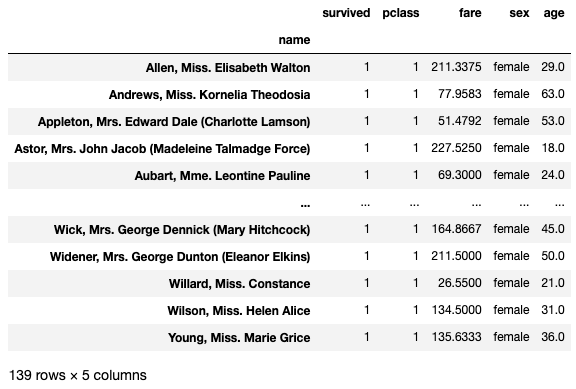
# 상류층 여성의 생존 명단 확인
first_class = titanic['pclass'] == 1
titanic[female_mask & first_class & survived_mask]

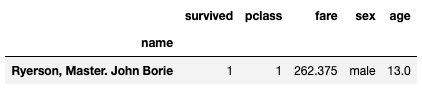
# 250 이상을 지불한 15세 미만의 어린이 생존 명단 확인
expensive_fare_mask = titanic['fare'] >= 250
titanic[young_mask & expensive_fare_mask & survived_mask]
- 범위 지정 필터링(between)
- 시리즈의 함수
- 주어진 범위 안에 있는 요소를 가진 불리언 시리즈를 반환
- NA값은 False로 처리
- inclusive=
- 포함할 경계를 지정
- 'left' : 왼쪽 경계값
- 'right' : 오른쪽 경계값
- 'both' : 왼쪽 오른쪽 모두 포함
# 20대 승객 찾기
twenties_mask = titanic['age'].between(20, 29)
titanic[twenties_mask]
결측치 처리
- isin(values)
- 각 요소가 특정 값들에 속하는지 여부를 불리언 시리즈로 반환
- values는 집합(set)이나 리스트 형태의 값들로 이루어진 시퀀스
- 파이썬의 "in"과 비슷
# pclass가 1이나 2인 승객
titanic['pclass'].isin([1,2])
- isnull()
- null 요소가 있는지 확인하는 메서드
- NA를 발견하면 True를 반환
# null이 있는 데이터 확인하기
titanic.isnull()

# age가 null인 승객의 수 확인
titanic['age'].isnull().sum()
- notnull()
- isnull()의 반대. NA가 아닌 걸 발견하면 True로 반환
titanic.notnull()

# 개수 확인
titanic['age'].notnull().sum()
행렬 인덱스 이름 변경
1. rename()
- 열 이름 변경
- rename(columns={'기존':'변경'})
# 방법 1 : rename을 이용하기
titanic.rename(columns={'pclass': 'class'}, inplace=True)

# 2개의 열을 변경하려면?
titanic.rename(columns={'class':'pclass', 'cost':'fare'}, inplace=True)
2. 같은 길이의 리스트를 준비해서 교체하기
# 방법 2 : pclass -> class, fare -> cost
titanic.columns = ['class', 'survived', 'sex', 'age', 'cost']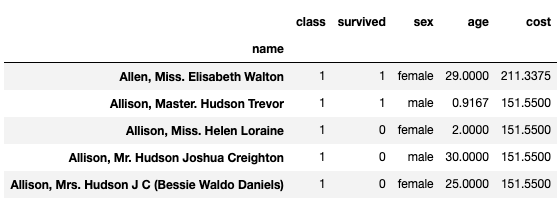
사용된 데이터셋 : 타이타닉
https://www.kaggle.com/competitions/titanic/submissions
Titanic - Machine Learning from Disaster | Kaggle
www.kaggle.com
'Data Science > TIL (Today I Learned)' 카테고리의 다른 글
| 프로그래머스 데이터분석 데브코스 1기 - 30일차 (1) | 2024.01.05 |
|---|---|
| 프로그래머스 데이터분석 데브코스 1기 - 29일차 (1) | 2024.01.04 |
| 프로그래머스 데이터분석 데브코스 1기 - 27일차 (1) | 2024.01.02 |
| 프로그래머스 데이터분석 데브코스 1기 - 26일차 (0) | 2024.01.01 |
| 프로그래머스 데이터분석 데브코스 1기 - 25일차 (0) | 2023.12.22 |